Jakarta Faces
Jakarta Faces, previously known as Jakarta Server Faces and Java Server Faces (JSF), is a Java specification designed for creating component-based user interfaces for web applications. It includes features such as UI components, state management, event handling, input validation, page navigation, and support for internationalization and accessibility.
Jakarta Faces 4.1 is a minor update, which mainly focuses on removing SecurityManager API and deprecating some legacy components, also add some small improvements, for developers, the significant change is allowing inject Flow in the back bean and add a new UUIDConverter for converting between UUID and String in Facelets. Since Jakarta Faces depends on Expression Language (EL), record types can be evaluated seamlessly via properties in Facelets.
Reuse the models in Expression Language (EL) and create a Jakarta Faces backing bean to initialize a Customer.
@RequestScoped
@Named
public class CustomerBean2 {
    private final static Logger LOGGER= Logger.getLogger(CustomerBean2.class.getName());

    @Inject
    FacesContext facesContext;

    private Customer customer;

    public Customer getCustomer() {
        return customer;
    }

    //@PostConstruct
    // use faces event to initialize it
    public void init(PreRenderViewEvent event) {
        if(facesContext.isPostback()){
            LOGGER.log(Level.INFO, "postback, skipping initialization");
            return;
        }

        LOGGER.log(Level.INFO, "initializing");
        customer = new Customer(
                "Foo",
                "Bar",
                Optional.of(new PhoneNumber("1", "1234567890")),
                new EmailAddress[]{
                        new EmailAddress("foo@example.com", true),
                        new EmailAddress("bar@example.com", false)
                },
                new Address("123 Main St", "Anytown", "CA", "12345")
        );
        LOGGER.log(Level.INFO, "initialized");
    }
}
Create a Facelets page to display the Customer information.
<!DOCTYPE html>
<html lang="en"
      xmlns="http://www.w3.org/1999/xhtml"
      xmlns:ui="jakarta.faces.facelets"
      xmlns:f="jakarta.faces.core"
      xmlns:h="jakarta.faces.html">
<f:view>
    <f:metadata>
        <f:event listener="#{customerBean2.init}" type="preRenderView"/>
    </f:metadata>
    <h:head>
        <title>Express Language 6.0!</title>
    </h:head>
    <h:body>
        <h1>Express Language 6.0</h1>

        <div>
            <strong>#{customerBean2.customer.firstName.concat(customerBean2.customer.lastName)}</strong>
            <hr/>
        </div>
        <div>PhoneNumber:
            <!--
            This expression does not work, which OptionalELResolver is enabled in Facelets.
            customerBean2.customer.phoneNumber.map(p-> '('.concat(p.countryCode).concat(')').concat(p.number)).orElse('NotFound')
            -->
            #{'('.concat(customerBean2.customer.phoneNumber.countryCode).concat(')').concat(customerBean2.customer.phoneNumber.number)}
        </div>
        <div>Emails: (#{customerBean2.customer.emailAddresses.length})</div>
        <ul>
            <ui:repeat value="#{customerBean2.customer.emailAddresses}" var="email">
                <li>#{email.email}(#{email.primary?'O':'X'})</li>
            </ui:repeat>
        </ul>
        <div>Address:</div>
        <div>
            #{customerBean2.customer.address.street}<br/>
            #{customerBean2.customer.address.city}<br/>
            #{customerBean2.customer.address.state} #{' '} #{customerBean2.customer.address.zipCode}
        </div>
    </h:body>
</f:view>
</html>
The OptionalELResolver is enabled by default in Facelets, so you can access customerBean2.customer.phoneNumber directly.
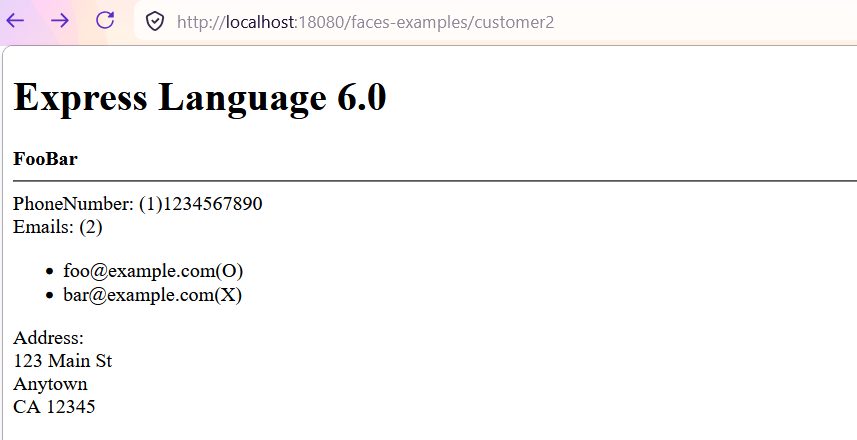
Clone the example project, open a terminal in the project root, run mvn clean package cargo:run -Pglassfish to build and run the application on the managed GlassFish server, then open a browser to http://localhost:18080/faces-examples/customer2.xhtml to see the result.
Check the full example code on Github and explore it yourself.