Building GraphQL APIs with Netflix DGS
This tutorial is for Java developers who know Spring Boot and want to build a GraphQL API with Netflix DGS (Domain Graph Service). You build a small blog API for posts, authors, and comments, connect it to PostgreSQL, and try it in GraphiQL.
Start with the core API, then explore optional extensions: reactive execution with WebFlux, generated types, custom scalars and directives, a typesafe client, and file uploads. This guide focuses on a single service; it does not cover federation or production deployment. The examples correspond to working modules in the spring-graphql-sample repository. Code excerpts omit package declarations and imports when they are not needed to understand the step.
Prerequisites
Before you begin, install or prepare the following:
- Java 25. The examples target Spring Boot 4.1.2 and Spring Framework 7.
- Docker running locally, for PostgreSQL.
- Git, if you want to clone and run the sample repository.
You do not need to install Maven separately; Spring Initializr generates a Maven Wrapper with the project.
Step 1: Create a Spring Boot project
Create a Maven project with Spring Initializr:
- Select Java 25 and Spring Boot 4.1.2.
- Set the group to
com.exampleand the artifact todemoto match the package names in the examples. - Add Spring Web, Validation, JDBC API, PostgreSQL Driver, and Lombok.
- Generate the project, extract it, and open it in your IDE.
A BOM (bill of materials) keeps related dependency versions aligned. Add
the DGS BOM to pom.xml, then add dgs-starter and the Spring Boot
dependencies for web, validation, and JDBC. The relevant parts of the POM
look like this:
<properties>
    <java.version>25</java.version>
    <dgs-platform.version>12.1.0</dgs-platform.version>
</properties>

<dependencyManagement>
    <dependencies>
        <dependency>
            <groupId>com.netflix.graphql.dgs</groupId>
            <artifactId>graphql-dgs-platform-dependencies</artifactId>
            <version>${dgs-platform.version}</version>
            <type>pom</type>
            <scope>import</scope>
        </dependency>
    </dependencies>
</dependencyManagement>

<dependencies>
    <dependency>
        <groupId>com.netflix.graphql.dgs</groupId>
        <artifactId>dgs-starter</artifactId>
    </dependency>
    <dependency>
        <groupId>org.springframework.boot</groupId>
        <artifactId>spring-boot-starter-webmvc</artifactId>
    </dependency>
    <dependency>
        <groupId>org.springframework.boot</groupId>
        <artifactId>spring-boot-starter-validation</artifactId>
    </dependency>
    <dependency>
        <groupId>org.springframework.boot</groupId>
        <artifactId>spring-boot-starter-data-jdbc</artifactId>
    </dependency>
    <dependency>
        <groupId>org.postgresql</groupId>
        <artifactId>postgresql</artifactId>
        <scope>runtime</scope>
    </dependency>
    <dependency>
        <groupId>org.projectlombok</groupId>
        <artifactId>lombok</artifactId>
        <scope>provided</scope>
    </dependency>
</dependencies>
The dependencies serve these roles:
dgs-starterconfigures DGS and its GraphQL execution support.spring-boot-starter-webmvcprovides the HTTP endpoint.spring-boot-starter-validationprovides Bean Validation.spring-boot-starter-data-jdbcand the PostgreSQL driver provideJdbcClientand PostgreSQL connectivity.
Step 2: Define GraphQL schema
A GraphQL schema is the contract that describes which data clients can read or change and what each operation returns. DGS is schema-first: you write that contract in the GraphQL Schema Definition Language (SDL), then connect Java code to its fields.
An object type describes data clients can select fields from. An input
type describes data clients can pass to an operation. Query is the root
type for reads, and Mutation is the root type for writes. In SDL, ! marks
a required value and square brackets mark a list.
Create a schema.graphql file in src/main/resources/schema and define the
blog types, queries, and mutation:
type Post {
    id: ID!
    title: String!
    content: String
    comments: [Comment]
    authorId: String
    author: Author
}

type Author {
    id: ID!
    name: String!
    email: String!
    posts: [Post]
}

type Comment {
    id: ID!
    content: String!
    postId: String!
}

input CreatePostInput {
    title: String!
    content: String!
}

type Query {
    allPosts: [Post!]!
    postById(postId: ID!): Post
}

type Mutation {
    createPost(createPostInput: CreatePostInput!): Post!
}
This schema exposes two queries and one mutation. The Post, Author, and
Comment object types describe returned data; CreatePostInput describes the
input to createPost. The schema also declares Author.posts, but the core
example does not implement that reverse relationship. Use Post.author in the
queries below; add an Author.posts data fetcher before querying the reverse
relationship.
Step 3: Set up PostgreSQL and persistence
The persistence layer has five parts: a database schema, a local PostgreSQL instance, Java records that map database rows, repositories that run SQL, and sample data. Complete these steps before you start the application.
Create database tables
Create a schema.sql file in src/main/resources:
CREATE TABLE IF NOT EXISTS users (
    id         BIGSERIAL PRIMARY KEY,
    name       VARCHAR(255) NOT NULL,
    email      VARCHAR(255) NOT NULL
);

CREATE TABLE IF NOT EXISTS posts (
    id         BIGSERIAL PRIMARY KEY,
    title      VARCHAR(255),
    content    VARCHAR(255),
    status     VARCHAR(255) DEFAULT 'DRAFT',
    author_id  BIGINT REFERENCES users(id) ON DELETE CASCADE
);

CREATE TABLE IF NOT EXISTS comments (
    id         BIGSERIAL PRIMARY KEY,
    content    VARCHAR(255),
    post_id    BIGINT REFERENCES posts(id) ON DELETE CASCADE
);
Set spring.sql.init.mode=always in application.properties so Spring Boot
creates these tables when the application starts:
Start PostgreSQL locally
For a standalone project, create a docker-compose.yml file in the project
root with a PostgreSQL service. This service uses the same database name and
credentials as the application:
services:
  postgres:
    image: postgres:16
    environment:
      POSTGRES_DB: blogdb
      POSTGRES_USER: user
      POSTGRES_PASSWORD: password
    ports:
      - "5432:5432"
Add these connection settings to src/main/resources/application.properties:
spring.datasource.url=jdbc:postgresql://localhost/blogdb
spring.datasource.username=user
spring.datasource.password=password
spring.sql.init.mode=always
The sample repository already has a shared PostgreSQL service in its root
docker-compose.yml; use that file instead of creating another one when you
run the sample.
Map database rows to Java records
Create a Java record for each table in package com.example.demo.model, one
record per file:
// PostEntity.java
public record PostEntity(
        Long id,
        String title,
        String content,
        String status,
        Long authorId
) {

}
// CommentEntity.java
public record CommentEntity(
        Long id,
        String content,
        Long postId
) {
}
// AuthorEntity.java
public record AuthorEntity(
        Long id,
        String name,
        String email
) {

}
Create repositories
Create a PostRepository class in package com.example.demo.repository to
read and write posts with Spring's JdbcClient:
@Component
@RequiredArgsConstructor
public class PostRepository {
    private final JdbcClient jdbcClient;

    public List<PostEntity> findAll() {
        String sql = "SELECT * FROM posts";
        return this.jdbcClient.sql(sql)
                .query(PostRepository::mapPost)
                .list();
    }

    public List<PostEntity> findByAuthorId(Long authorId) {
        String sql = """
                SELECT * FROM posts
                WHERE author_id = :author_id
                """;
        return this.jdbcClient.sql(sql)
                .param("author_id", authorId)
                .query(PostRepository::mapPost)
                .list();
    }

    public PostEntity findById(Long id) {
        String sql = """
                SELECT * FROM posts
                WHERE id = :id
                """;
        return this.jdbcClient.sql(sql)
                .param("id", id)
                .query(PostRepository::mapPost)
                .optional()
                .orElse(null);
    }

    public Long create(String title, String content, String status, Long authorId) {
        String sql = """
                INSERT INTO posts (title, content, status, author_id)
                VALUES (:title, :content, :status, :author_id)
                """;
        GeneratedKeyHolder keyHolder = new GeneratedKeyHolder();
        this.jdbcClient.sql(sql)
                .param("title", title)
                .param("content", content)
                .param("status", status)
                .param("author_id", authorId)
                .update(keyHolder, "id");
        return keyHolder.getKeyAs(Long.class);
    }

    public int deleteAll() {
        String sql = "DELETE FROM posts";
        return this.jdbcClient.sql(sql).update();
    }

    private static PostEntity mapPost(ResultSet rs, int rowNum) throws SQLException {
        return new PostEntity(
                rs.getObject("id", Long.class),
                rs.getString("title"),
                rs.getString("content"),
                rs.getString("status"),
                rs.getObject("author_id", Long.class)
        );
    }
}
PostRepository uses JdbcClient to run SQL and map rows to PostEntity.
The create method inserts a post and returns the generated id, and mapPost
maps a ResultSet row to a PostEntity.
Create CommentRepository and AuthorRepository classes in package
com.example.demo.repository for the other tables:
// CommentRepository.java
@Component
@RequiredArgsConstructor
public class CommentRepository {
    private final JdbcClient jdbcClient;

    public List<CommentEntity> findAll() {
        String sql = "SELECT * FROM comments";
        return this.jdbcClient.sql(sql)
                .query(CommentRepository::mapComment)
                .list();
    }

    public List<CommentEntity> findByPostId(Long postId) {
        String sql = """
                SELECT * FROM comments
                WHERE post_id = :post_id
                """;
        return this.jdbcClient.sql(sql)
                .param("post_id", postId)
                .query(CommentRepository::mapComment)
                .list();
    }

    public List<CommentEntity> findByPostIdIn(List<Long> postId) {
        String sql = """
                SELECT * FROM comments
                WHERE post_id IN (:post_id)
                """;
        return this.jdbcClient.sql(sql)
                .param("post_id", postId)
                .query(CommentRepository::mapComment)
                .list();
    }

    public Long create(String content, Long postId) {
        String sql = """
                INSERT INTO comments (content, post_id)
                VALUES (:content, :post_id)
                """;
        GeneratedKeyHolder keyHolder = new GeneratedKeyHolder();
        this.jdbcClient.sql(sql)
                .param("content", content)
                .param("post_id", postId)
                .update(keyHolder, "id");
        return keyHolder.getKeyAs(Long.class);
    }

    public int deleteAll() {
        String sql = "DELETE FROM comments";
        return this.jdbcClient.sql(sql).update();
    }

    private static CommentEntity mapComment(ResultSet rs, int rowNum) throws SQLException {
        return new CommentEntity(
                rs.getLong("id"),
                rs.getString("content"),
                rs.getLong("post_id")
        );
    }
}

// AuthorRepository.java
@Component
@RequiredArgsConstructor
public class AuthorRepository {
    private final JdbcClient jdbcClient;

    public List<AuthorEntity> findAll() {
        String sql = "SELECT * FROM users";
        return this.jdbcClient.sql(sql)
                .query(AuthorRepository::mapAuthor)
                .list();
    }

    public AuthorEntity findById(Long id) {
        String sql = """
                SELECT * FROM users
                WHERE id = :id
                """;
        return this.jdbcClient.sql(sql)
                .param("id", id)
                .query(AuthorRepository::mapAuthor)
                .optional()
                .orElse(null);
    }

    public List<AuthorEntity> findByIdIn(List<Long> id) {
        String sql = """
                SELECT * FROM users
                WHERE id IN (:id)
                """;
        return this.jdbcClient.sql(sql)
                .param("id", id)
                .query(AuthorRepository::mapAuthor)
                .list();
    }

    public Long create(String name, String email) {
        String sql = """
                INSERT INTO users (name, email)
                VALUES (:name, :email)
                """;
        GeneratedKeyHolder keyHolder = new GeneratedKeyHolder();
        this.jdbcClient.sql(sql)
                .param("name", name)
                .param("email", email)
                .update(keyHolder, "id");
        return keyHolder.getKeyAs(Long.class);
    }

    public int deleteAll() {
        String sql = "DELETE FROM users";
        return this.jdbcClient.sql(sql).update();
    }

    private static AuthorEntity mapAuthor(ResultSet rs, int rowNum) throws SQLException {
        return new AuthorEntity(
                rs.getLong("id"),
                rs.getString("name"),
                rs.getString("email")
        );
    }
}
Seed sample data
An ApplicationRunner runs after Spring starts. Create a DataInitializer
class in package com.example.demo to seed sample authors, posts, and
comments, so you can query data right away:
@Component
@RequiredArgsConstructor
@Slf4j
public class DataInitializer implements ApplicationRunner {
    final PostRepository posts;
    final CommentRepository comments;
    final AuthorRepository authors;

    @Override
    public void run(ApplicationArguments args) throws Exception {
        log.info("start data initialization...");
        int commentsDel = this.comments.deleteAll();
        int postDel = this.posts.deleteAll();
        int authorsDel = this.authors.deleteAll();

        log.info("deleted rows: authors: {}, comments: {}, posts: {}", authorsDel, commentsDel, postDel);
        var authorId = this.authors.create("user", "user@example.com");
        IntStream.range(1, 5)
                .forEach(
                        i -> {
                            var postId = this.posts.create("Dgs post #" + i, "test content of #" + i, PostStatus.DRAFT.name(), authorId);

                            IntStream.range(1, new Random().nextInt(5) + 1)
                                    .forEach(c -> this.comments.create("comment #" + c, postId));
                        }
                );

        this.posts.findAll().forEach(p -> log.info("post: {}", p));
        this.comments.findAll().forEach(p -> log.info("comment: {}", p));
        this.authors.findAll().forEach(p -> log.info("author: {}", p));
        log.info("done data initialization...");
    }
}
The sample initializer deletes existing authors, posts, and comments before it seeds new rows. Use it only with a disposable local database; do not copy this cleanup behavior into production.
The persistence layer is ready. Next, create the GraphQL models and connect them to the repositories through a service and data fetchers.
Step 4: Model GraphQL types
GraphQL models are the Java objects returned by your data fetchers. Create a
Java class for each schema object type in package com.example.demo.gql.types.
Start with Post:
@Data
@Builder
@ToString
@Slf4j
public class Post {
    Long id;
    String title;
    String content;
    @Builder.Default
    PostStatus status = PostStatus.DRAFT;
    @Builder.Default
    List<Comment> comments = new ArrayList<>();
    Long authorId;
    Author author;

    public void addComment(Comment comment) {
        comment.setPostId(this.id);
        this.comments.add(comment);
        log.info("post comments: {}", this.comments);
    }
}
Create Author and Comment classes in package com.example.demo.gql.types
to represent the remaining schema types.
PostStatus is an application enum used to map the stored post status; the
core schema does not expose it. The code-generation extension later adds it to
the GraphQL schema. CreatePostInput represents the schema's create-post
input; the CommentInput model is used by the WebFlux extension:
// Author.java
@Data
@Builder
@ToString
public class Author {
    Long id;
    String name;
    String email;
}

// Comment.java
@Data
@Builder
@ToString
public class Comment {
    Long id;
    Long postId;
    String content;
}

// CreatePostInput.java
@Getter
@Setter
@ToString
@RequiredArgsConstructor
public class CreatePostInput {
    @NotEmpty
    @Length(min = 5, max = 100)
    String title;

    @NotEmpty
    String content;
}

// CommentInput.java
@Getter
@Setter
@ToString
@RequiredArgsConstructor
public class CommentInput {

    @NotEmpty
    @Length(min = 10, max = 50)
    String content;

    @NotEmpty
    String postId;
}

// PostStatus.java
public enum PostStatus {
    DRAFT, PUBLISHED
}
Input types can declare Bean Validation constraints. @NotEmpty requires a
value, and @Length limits the title. These annotations do not run by
themselves: to validate a GraphQL argument, add @Valid to the argument and
@Validated to the fetcher class. The WebFlux example later shows this
configuration.
Step 5: Implement data fetchers
A data fetcher resolves a GraphQL schema field. A request enters through a
Query or Mutation fetcher; DGS also resolves nested fields such as
Post.author when a client selects them. Mark the containing class with
@DgsComponent, then bind methods to schema fields with DGS annotations.
Create a PostsDataFetcher class in package
com.example.demo.gql.datafetchers. Use @DgsQuery and @DgsMutation for
root operations, and @DgsData for nested fields.
When a query selects nested fields such as Post.author, each field is
resolved for every returned post. The N+1 problem occurs when this causes
one extra database or service call per post. A DataLoader collects those
lookup keys, batches them, and caches results for the current request. The
following resolver class handles root operations and delegates nested lookups
to DataLoaders:
@DgsComponent
@RequiredArgsConstructor
public class PostsDataFetcher {
    private final PostService postService;

    @DgsQuery
    public List<Post> allPosts() {
        return this.postService.getAllPosts();
    }

    @DgsQuery
    public Post postById(@InputArgument Long postId) {
        return this.postService.getPostById(postId);
    }

    @DgsData(parentType = "Post", field = "author")
    public CompletableFuture<Author> author(DgsDataFetchingEnvironment dfe) {
        DataLoader<Long, Author> dataLoader = dfe.getDataLoader("authorsLoader");
        Post post = dfe.getSource();
        return dataLoader.load(post.getAuthorId());
    }

    @DgsData(parentType = "Post", field = "comments")
    public CompletableFuture<List<Comment>> comments(DgsDataFetchingEnvironment dfe) {
        DataLoader<Long, List<Comment>> dataLoader = dfe.getDataLoader(CommentsDataLoader.class);
        Post post = dfe.getSource();
        return dataLoader.load(post.getId());
    }

    @DgsMutation
    public Post createPost(@InputArgument("createPostInput") CreatePostInput input) {
        var id = this.postService.createPost(input);
        return this.postService.getPostById(id);
    }
}
The annotations, in order of appearance:
@DgsComponent— a Spring stereotype that marks the class as a container of data fetchers.@DgsQuery/@DgsMutation— bind a method to a field on theQuery/Mutationroot type, matched by method name.allPosts()serves theallPostsfield.@DgsData(parentType = "Post", field = "author")— binds a method to a nested field on any type.dfe.getSource()returns the parentPost.@InputArgument— binds a GraphQL argument to a parameter, coercing it to the parameter type.@InputArgument("createPostInput")names the argument explicitly because the parameter isinput, notcreatePostInput.
Add service layer
The service layer keeps database access out of your data fetchers. It calls
the repositories and maps database entities to GraphQL models. Create a
PostService class in package com.example.demo.service:
@Service
@RequiredArgsConstructor
public class PostService {
    private static final Function<PostEntity, Post> POST_MAPPER = p -> Post.builder()
            .id(p.id())
            .title(p.title())
            .content(p.content())
            .status(PostStatus.valueOf(p.status()))
            .authorId(p.authorId())
            .build();
    public static final Function<CommentEntity, Comment> COMMENT_MAPPER = c -> Comment.builder()
            .id(c.id())
            .content(c.content())
            .postId(c.postId())
            .build();
    final PostRepository posts;
    final CommentRepository comments;
    final AuthorRepository authors;

    public List<Post> getAllPosts() {
        return this.posts.findAll()
                .stream()
                .map(POST_MAPPER)
                .toList();
    }

    public Post getPostById(Long id) {
        var postEntity = this.posts.findById(id);
        return Optional.ofNullable(postEntity)
                .map(POST_MAPPER)
                .orElseThrow(() -> new PostNotFoundException(id));
    }

    List<Post> getPostsByAuthorId(Long id) {
        return this.posts.findByAuthorId(id)
                .stream()
                .map(POST_MAPPER)
                .toList();
    }

    public Long createPost(CreatePostInput postInput) {
        var authorId = this.authors.findAll().get(0).id();
        Long id = this.posts.create(postInput.getTitle(), postInput.getContent(), "DRAFT", authorId);
        return id;
    }

    public List<Comment> getCommentsByPostId(Long id) {
        return this.comments.findByPostId(id)
                .stream()
                .map(COMMENT_MAPPER)
                .toList();
    }

    public List<Comment> getCommentsByPostIdIn(Set<Long> ids) {
        return this.comments.findByPostIdIn(new ArrayList<>(ids))
                .stream()
                .map(COMMENT_MAPPER)
                .toList();
    }
}
Batch nested-field lookups
The authorsLoader implements a batched lookup. Register it with
@DgsDataLoader; DGS gathers keys requested by the field fetchers and passes
them to load together. For example, ten posts can load their authors with
one WHERE id IN (...) query instead of ten individual queries. Create
AuthorsDataLoader and CommentsDataLoader classes in package
com.example.demo.gql.dataloaders:
@DgsDataLoader(name = "authorsLoader")
@RequiredArgsConstructor
public class AuthorsDataLoader implements BatchLoader<Long, Author> {
    private final AuthorService authorService;

    @Override
    public CompletionStage<List<Author>> load(List<Long> keys) {
        return CompletableFuture.supplyAsync(() -> this.authorService.getAuthorByIdIn(keys));
    }
}
In the author fetcher above, getDataLoader("authorsLoader") retrieves this
loader and load(post.getAuthorId()) queues the lookup. Use the same pattern
for nested fields backed by another table or a remote call.
The comments fetcher is different because each key maps to a list of
comments. DGS provides MappedBatchLoader for exactly this case; it returns a
map from key to value. CommentsDataLoader loads all comments for the
requested posts and groups them by post id:
@DgsDataLoader(name = "comments")
@RequiredArgsConstructor
@Slf4j
public class CommentsDataLoader implements MappedBatchLoader<Long, List<Comment>> {
    final PostService postService;

    @Override
    public CompletionStage<Map<Long, List<Comment>>> load(Set<Long> keys) {
        List<Comment> comments = this.postService.getCommentsByPostIdIn(keys);

        Map<Long, List<Comment>> mappedComments = new HashMap<>();
        keys.forEach(
                k -> mappedComments.put(k, comments
                        .stream()
                        .filter(c -> c.getPostId().equals(k)).toList())
        );
        log.info("mapped comments: {}", mappedComments);
        return CompletableFuture.supplyAsync(() -> mappedComments);
    }
}
To push live updates to the clients — new comments, for example — add a subscription; see Subscriptions.
Step 6: Handle errors
Error handling converts exceptions thrown during field resolution into
errors in the GraphQL response. Implement DataFetcherExceptionHandler to
choose how known exceptions map to errors, while delegating unexpected ones to
the default handler. DGS's TypedGraphQLError can attach a well-known error
type such as NOT_FOUND. Create a CustomDataFetchingExceptionHandler class
in package com.example.demo.gql:
@Component
public class CustomDataFetchingExceptionHandler implements DataFetcherExceptionHandler {
    private final DefaultDataFetcherExceptionHandler defaultHandler =
            new DefaultDataFetcherExceptionHandler();

    @Override
    public CompletableFuture<DataFetcherExceptionHandlerResult> handleException(
            DataFetcherExceptionHandlerParameters handlerParameters) {
        Throwable exception = handlerParameters.getException();
        if (exception instanceof AuthorNotFoundException || exception instanceof PostNotFoundException) {
            GraphQLError error = TypedGraphQLError.newNotFoundBuilder()
                    .message(exception.getMessage())
                    .path(handlerParameters.getPath())
                    .build();
            return CompletableFuture.completedFuture(
                    DataFetcherExceptionHandlerResult.newResult().error(error).build());
        }
        return defaultHandler.handleException(handlerParameters);
    }
}
Now a postById request for a missing id returns a typed NOT_FOUND error
with a clear message. The dgs-webflux module also maps
ConstraintViolationException to a typed BAD_REQUEST, so validation
failures are reported consistently.
Step 7: Run application
Start PostgreSQL and the application. The following steps use the checked-in sample; if you created a standalone project, run Docker Compose and its Maven Wrapper from that project's root directory:
-
From the repository root, start the shared PostgreSQL container:
The
docker-compose.ymlcreates ablogdbdatabase with useruserand passwordpassword, matchingapplication.properties. -
Start the DGS application:
On Windows, run
mvnw.cmd spring-boot:runfrom thedgsdirectory. For a standalone project, omitcd dgs.
When the Started DemoApplication log line appears, the server is ready.
Open http://localhost:8080/graphiql in your browser to run a GraphQL
operation. The server provides GraphiQL at this path.
Step 8: Test APIs in GraphiQL
GraphiQL is an in-browser GraphQL IDE. It reads the schema through introspection and provides field completion, schema documentation, and a query runner. The schema explorer is on the left; use the operation editor and response panel to try the API.
Create a post
A mutation changes server-side data. Paste this operation into the editor and run it to create a post and return its id, title, and content:
mutation {
  createPost(createPostInput: { title: "Hello DGS", content: "My first post" }) {
    id
    title
    content
  }
}
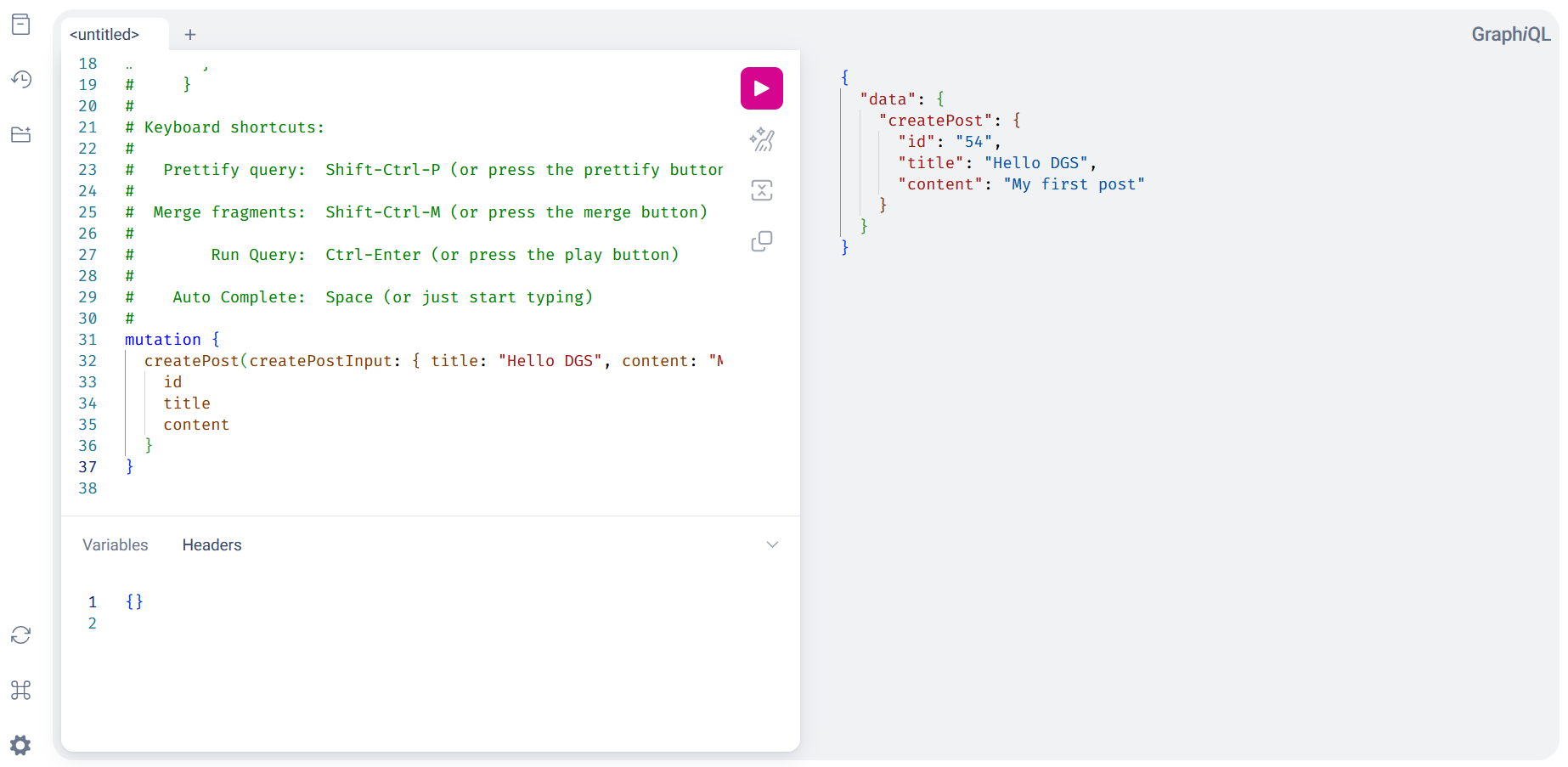
GraphiQL should show the new post's id, title, and content. Next, list posts and check that the new post appears with its author and comments.
List posts
A query reads data without changing it. Paste this operation into the
editor and run it. allPosts returns every post, and the nested selections
request each post's author and comments:
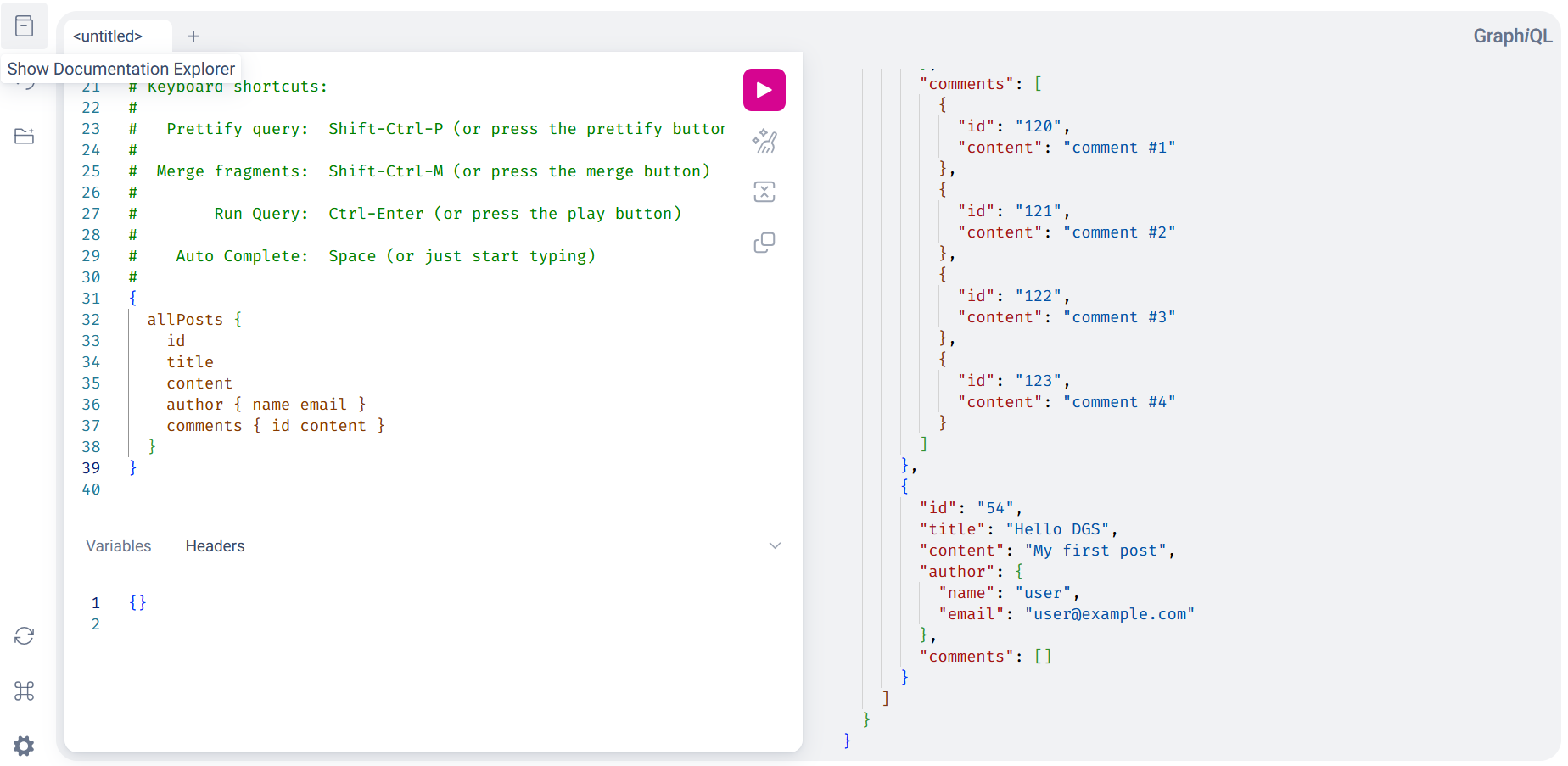
Because the author and comments live in separate tables, allPosts is exactly
where the DataLoaders earn their keep — a plain nested fetch would run one
query per post.
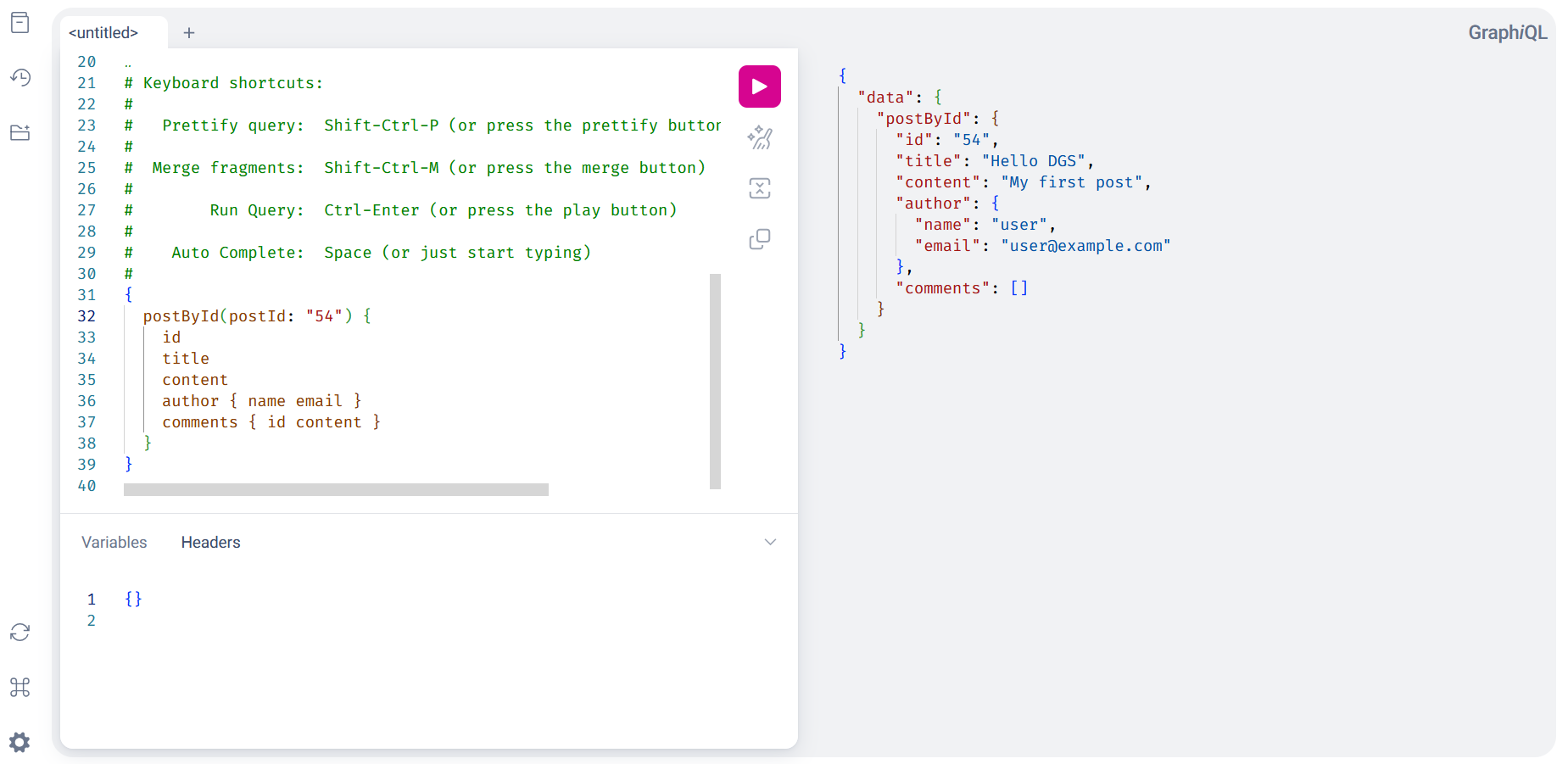
Fetch one post
Use postById to request one post by id. Replace 1 with an id from the
allPosts result above; GraphQL returns only the fields in the selection set:
Fetch a non-existent post
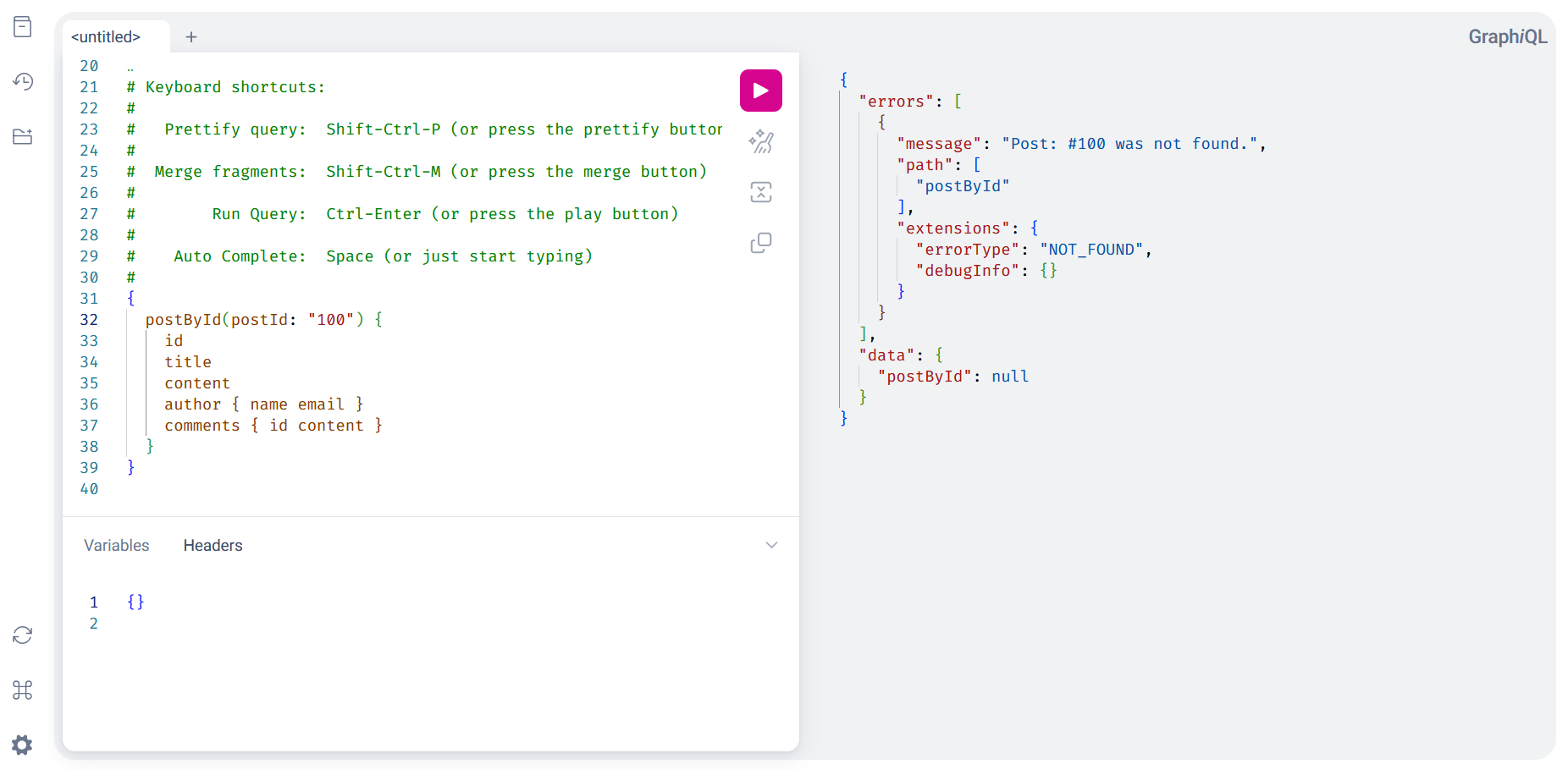
Requesting a post that does not exist still returns data, but postById is
null, and the response includes an errors entry with the message and a
NOT_FOUND error type. Replace 1000 with an id that has no matching post,
then run the query:
To compare this walkthrough with runnable code, explore the
dgs module.
The dgs-codegen module
shows the generated-type variant, and the
dgs-webflux module
includes reactive validation and typed error handling.
GraphiQL is enabled by default. To disable it, add
spring.graphql.graphiql.enabled=false to application.properties:
Generate types from schema
Code generation creates Java types and constants from the GraphQL schema,
reducing the chance that Java code and schema names drift apart. The
dgs-codegen module uses the DGS codegen Maven plugin to generate
Post, Author, CreatePostInput, and a DgsConstants class.
To try it, set the plugin version in pom.xml:
Add the codegen plugin under build/plugins. Point schemaPaths at your SDL
files and choose the generated Java package:
<plugin>
    <groupId>io.github.deweyjose</groupId>
    <artifactId>graphqlcodegen-maven-plugin</artifactId>
    <version>${dgs-codegen-plugin.version}</version>
    <executions>
        <execution>
            <id>dgs-codegen</id>
            <goals><goal>generate</goal></goals>
            <configuration>
                <schemaPaths>
                    <param>${project.basedir}/src/main/resources/schema</param>
                </schemaPaths>
                <packageName>com.example.demo.gql</packageName>
                <generateClientApi>true</generateClientApi>
            </configuration>
        </execution>
    </executions>
</plugin>
The Maven plugin does not register its output directory as a source root.
Add build-helper-maven-plugin so Maven compiles the generated files:
<plugin>
    <groupId>org.codehaus.mojo</groupId>
    <artifactId>build-helper-maven-plugin</artifactId>
    <executions>
        <execution>
            <id>add-dgs-source</id>
            <phase>generate-sources</phase>
            <goals>
                <goal>add-source</goal>
            </goals>
            <configuration>
                <sources>
                    <source>${project.build.directory}/generated-sources</source>
                </sources>
            </configuration>
        </execution>
    </executions>
</plugin>
If you generate the client API, add graphql-dgs-codegen-shared-core; it
provides base classes used by the generated client. The Maven plugin does not
add this dependency automatically. Use the version property from the sample
POM or set the version shown here:
<dependency>
    <groupId>com.netflix.graphql.dgs.codegen</groupId>
    <artifactId>graphql-dgs-codegen-shared-core</artifactId>
    <version>8.8.0</version>
</dependency>
Run ./mvnw compile from the module root. Maven generates the Java types and
compiles them with your application code.
The generated types follow the schema. This version adds an enum, a timestamp, and two concepts used later in the tutorial:
directive @uppercase on FIELD_DEFINITION
scalar LocalDateTime
scalar UUID

type Post {
    id: ID!
    title: String! @uppercase
    content: String
    comments: [Comment]
    status: PostStatus
    createdAt: LocalDateTime
    authorId: String
    author: Author
}

enum PostStatus {
    DRAFT, PENDING_MODERATION, PUBLISHED
}
An enum restricts a field to a known set of values. A scalar is a
single value such as a string or timestamp. A directive is metadata on a
schema element that can alter behavior; here, @uppercase decorates the
title field.
The fetchers now reference the generated constants instead of hard-coded strings, and the generated types instead of hand-written ones:
@DgsData(
    parentType = DgsConstants.POST.TYPE_NAME,
    field = DgsConstants.POST.Author
)
public CompletableFuture<Author> author(DgsDataFetchingEnvironment dfe) {
    DataLoader<String, Author> dataLoader = dfe.getDataLoader("authorsLoader");
    Post post = dfe.getSource();
    return dataLoader.load(post.getAuthorId());
}
DgsConstants.POST.TYPE_NAME and DgsConstants.POST.Author are generated, so
a schema rename becomes a compile error rather than a silent typo.
For a complete code-generation setup, explore the
dgs-codegen module.
Subscriptions
A subscription is a long-lived GraphQL operation. The client opens it
once and the server keeps pushing results until the client goes away. DGS
turns a method that returns a reactive Publisher into such a subscription
with @DgsSubscription.
Define Subscription Schema
Add a root Subscription type and the mutation that produces the events:
type Comment {
    id: ID!
    content: String!
    createdAt: LocalDateTime
    postId: String!
}

input CommentInput {
    postId: String!
    content: String!
}

type Mutation {
    createPost(createPostInput: CreatePostInput!): UUID!
    addComment(commentInput: CommentInput!): Comment!
}

type Subscription {
    commentAdded: Comment!
}
Publish Events to Clients
The service owns the event stream. A Reactor Sinks.Many is the hot
publisher the subscription is built on: the mutation emits into the sink, the
subscription reads from it.
@Service
@RequiredArgsConstructor
public class PostService {
    ... // the repositories

    // the sink the `commentAdded` subscription is fed from.
    private final Sinks.Many<Comment> commentSink = Sinks.many().replay().latest();

    public Comment addComment(CommentInput commentInput) {
        var postId = UUID.fromString(commentInput.getPostId());
        var commentId = this.comments.create(commentInput.getContent(), postId);
        var comment = Comment.newBuilder()
                .id(commentId.toString())
                .content(commentInput.getContent())
                .createdAt(LocalDateTime.now())
                .postId(postId.toString())
                .build();
        this.commentSink.emitNext(comment, Sinks.EmitFailureHandler.FAIL_FAST);
        return comment;
    }

    public Publisher<Comment> commentAdded() {
        return this.commentSink.asFlux();
    }
}
Sinks.many().replay().latest() keeps the last published comment, so a client
that subscribes a moment too late still receives it. Use
Sinks.many().multicast().directBestEffort() instead when every subscriber
should only see the events published after it subscribed.
The fetcher is a one-liner; DGS binds the method to the commentAdded field of
the Subscription root type.
@DgsComponent
@RequiredArgsConstructor
public class PostsDataFetcher {
    private final PostService postService;

    ... // the query and the nested field fetchers

    @DgsMutation
    public Comment addComment(@InputArgument("commentInput") CommentInput input) {
        return this.postService.addComment(input);
    }

    @DgsSubscription
    public Publisher<Comment> commentAdded() {
        return this.postService.commentAdded();
    }
}
The reactive Sinks API comes from Reactor:
<dependency>
    <groupId>io.projectreactor</groupId>
    <artifactId>reactor-core</artifactId>
</dependency>
Spring GraphQL publishes the very same subscription over two transports, so one endpoint serves both of them:

Over HTTP/SSE
The Server-Sent-Events transport is part of spring-boot-graphql, so it needs
no extra dependency. Give the SSE responses a sensible timeout:
spring.graphql.http.sse.timeout=45s
# the servlet stack keeps the SSE request open through the async request timeout
spring.mvc.async.request-timeout=45000
Over WebSocket
The WebSocket transport needs the WebSocket starter:
<dependency>
    <groupId>org.springframework.boot</groupId>
    <artifactId>spring-boot-starter-websocket</artifactId>
</dependency>
Point it at the same path as the HTTP endpoint:
spring.graphql.websocket.path=/graphql
spring.graphql.websocket.connection-init-timeout=30s
spring.graphql.websocket.keep-alive=60s
Both live under the same path as the ordinary HTTP endpoint, so one GraphQL service serves queries, mutations and subscriptions over HTTP, over Server-Sent Events and over WebSocket at the same time.
Subscribe in Clients
The DGS client libraries speak both transports. The SSE client opens a
text/event-stream request, the WebSocket client speaks graphql-transport-ws:
var baseUrl = "http://localhost:8080/graphql";

// Server-Sent Events
var sseClient = new DgsGraphqlSSESubscriptionGraphQLClient(baseUrl, WebClient.create(baseUrl));
sseClient.reactiveExecuteQuery("""
        subscription onCommentAdded {
            commentAdded {
                id
                postId
                content
            }
        }
        """, Map.of())
        .map(response -> response.extractValueAsObject("commentAdded.content", String.class))
        .subscribe(System.out::println);

// WebSocket
var socketClient = WebSocketGraphQlClient.create(
        URI.create("ws://localhost:8080/graphql"),
        new ReactorNettyWebSocketClient());
socketClient.start().subscribe();
socketClient.document("""
        subscription onCommentAdded {
            commentAdded {
                id
                postId
                content
            }
        }
        """).executeSubscription()
        .map(response -> response.getData())
        .subscribe(System.out::println);
graphql-transport-ws is the sub-protocol Spring GraphQL supports; the older
apollo/subscriptions-transport-ws protocol is rejected.
For a complete implementation of both transports on one GraphQL path, explore
the dgs-codegen module.
Scalars
A scalar is a leaf value in a GraphQL response: clients select it directly
but cannot request subfields from it. GraphQL has built-in scalars such as
String and Int; a custom scalar adds a domain-specific value type.
The schema in the code-generation section declares LocalDateTime. Register
a coercer with @DgsScalar to convert between Java values and the string
representation sent over GraphQL. Implement serialization and both input
parsing paths:
@DgsScalar(name = "LocalDateTime")
public class LocalDateTimeScalar implements Coercing<LocalDateTime, String> {

    @Override
    public String serialize(Object dataFetcherResult, GraphQLContext ctx, Locale locale) {
        if (dataFetcherResult instanceof LocalDateTime dateTime) {
            return dateTime.format(DateTimeFormatter.ISO_DATE_TIME);
        }
        throw new CoercingSerializeException("Not a valid DateTime");
    }

    @Override
    public LocalDateTime parseValue(Object input, GraphQLContext ctx, Locale locale) {
        if (input instanceof String value) {
            return LocalDateTime.parse(value, DateTimeFormatter.ISO_DATE_TIME);
        }
        throw new CoercingParseValueException("Value is not a valid ISO date time");
    }

    @Override
    public LocalDateTime parseLiteral(Value<?> input, CoercedVariables variables,
                                      GraphQLContext ctx, Locale locale) {
        if (input instanceof StringValue value) {
            return LocalDateTime.parse(value.getValue(), DateTimeFormatter.ISO_DATE_TIME);
        }
        throw new CoercingParseLiteralException("Value is not a valid ISO date time");
    }
}
serialize converts the Java value to an ISO string for the response.
parseValue handles variables, and parseLiteral handles values written
directly in a GraphQL document. A UUIDScalar follows the same pattern for
java.util.UUID. The checked-in dgs-codegen scalar accepts a
LocalDateTime object in parseValue; the string parsing shown here is needed
for standard ISO date-time strings in GraphQL JSON variables. The
graphql-dgs-extended-scalars dependency also provides scalars for common
types.
See the
dgs-codegen module
for a working custom-scalar example.
Directives
A directive is an annotation in the schema that adds behavior to a type,
field, or argument. The schema already declares @uppercase for fields.
Register its behavior by implementing SchemaDirectiveWiring and wrapping the
field's data fetcher:
@DgsDirective(name = "uppercase")
public class UppercaseDirectiveWiring implements SchemaDirectiveWiring {

    @Override
    public GraphQLFieldDefinition onField(SchemaDirectiveWiringEnvironment<GraphQLFieldDefinition> env) {
        var field = env.getElement();
        var parentType = env.getFieldsContainer();
        var coordinates = FieldCoordinates.coordinates(parentType, field.getName());
        var original = env.getCodeRegistry().getDataFetcher(coordinates, field);

        var dataFetcher = DataFetcherFactories.wrapDataFetcher(original, (dfe, value) ->
                value instanceof String s ? s.toUpperCase() : value);

        env.getCodeRegistry().dataFetcher(coordinates, dataFetcher);
        return field;
    }
}
Because the schema marks title: String! @uppercase, every title that comes
back from the server is upper-cased — the directive changed the field's
behavior without touching the fetcher.
The dgs-codegen module
also includes a working custom-directive example.
Switch to WebFlux
WebFlux is Spring's reactive web stack. R2DBC provides reactive
relational database access, unlike the blocking JDBC API used above. The
dgs-webflux module keeps the same domain and schema but replaces the
servlet/JDBC dependencies with WebFlux and R2DBC. Replace the MVC and JDBC
dependencies with these:
<dependency>
    <groupId>org.springframework.boot</groupId>
    <artifactId>spring-boot-starter-webflux</artifactId>
</dependency>
<dependency>
    <groupId>org.springframework.boot</groupId>
    <artifactId>spring-boot-starter-data-r2dbc</artifactId>
</dependency>
<dependency>
    <groupId>org.postgresql</groupId>
    <artifactId>r2dbc-postgresql</artifactId>
    <scope>runtime</scope>
</dependency>
Make the same change in your application: replace webmvc with webflux and
JDBC with R2DBC. You must also update the repository and service layers to
use reactive database operations; changing dependencies alone does not make
blocking JDBC code reactive.
This module also adds a second mutation (addComment), so it is the one to
copy when you need real-time updates.
Data Fetchers
Fetchers then return Reactor's Mono (zero or one value) or Flux (a stream
of values); the DGS annotations stay the same. The fetcher methods look like
this:
@DgsComponent
@Validated
public class PostsDataFetcher {
    private final PostService postService;
    private final AuthorService authorService;

    @DgsQuery
    public Flux<Post> allPosts() {
        return this.postService.getAllPosts();
    }

    @DgsQuery
    public Mono<Post> postById(@InputArgument Long postId) {
        return this.postService.getPostById(postId);
    }

    @DgsMutation
    public Mono<Post> createPost(@InputArgument("createPostInput") @Valid CreatePostInput input) {
        return this.postService.createPost(input).flatMap(id -> this.postService.getPostById(id));
    }

    @DgsMutation
    public Mono<Comment> addComment(@InputArgument("commentInput") @Valid CommentInput input) {
        return this.postService.addComment(input);
    }
}
@Validon the argument turns on Bean Validation forCreatePostInput.- The
flatMapincreatePostchains the insert with the lookup of the created post, so the mutation still returns the whole entity.
Subscriptions
The subscription works the same way as in the
Subscriptions section — a Sinks.Many in the service, and a
@DgsSubscription fetcher that returns the reactive Publisher:
The event is published as a side effect of the successful mutation, and the
subscription is served over the same two transports, on the same /graphql
path as the ordinary HTTP endpoint. The transport configuration and the
client code are described in Subscriptions.
To explore the reactive version, see the
dgs-webflux module.
Typesafe client
A typesafe GraphQL client builds operations and field selections using
generated Java classes rather than hand-written query strings. Reuse the DGS
codegen Maven plugin from the previous section and set generateClientApi to
true to generate the client API alongside the schema types. Add
graphql-dgs-client and spring-boot-starter-restclient to build and execute
client requests.
Add these version properties and import the DGS bill of materials (BOM) in
pom.xml:
<properties>
    <dgs-platform.version>12.1.0</dgs-platform.version>
    <dgs-codegen-plugin.version>3.10.2</dgs-codegen-plugin.version>
    <dgs-codegen-core.version>8.8.0</dgs-codegen-core.version>
</properties>

<dependencyManagement>
    <dependencies>
        <dependency>
            <groupId>com.netflix.graphql.dgs</groupId>
            <artifactId>graphql-dgs-platform-dependencies</artifactId>
            <version>${dgs-platform.version}</version>
            <type>pom</type>
            <scope>import</scope>
        </dependency>
    </dependencies>
</dependencyManagement>
Add the generated-client support library, DGS client, and Spring HTTP client dependencies. The sample also includes WebMVC and the Jackson Kotlin module:
<dependencies>
    <dependency>
        <groupId>com.netflix.graphql.dgs.codegen</groupId>
        <artifactId>graphql-dgs-codegen-shared-core</artifactId>
        <version>${dgs-codegen-core.version}</version>
    </dependency>
    <dependency>
        <groupId>com.netflix.graphql.dgs</groupId>
        <artifactId>graphql-dgs-client</artifactId>
    </dependency>
    <dependency>
        <groupId>tools.jackson.module</groupId>
        <artifactId>jackson-module-kotlin</artifactId>
    </dependency>
    <dependency>
        <groupId>org.springframework.boot</groupId>
        <artifactId>spring-boot-starter-webmvc</artifactId>
    </dependency>
    <dependency>
        <groupId>org.springframework.boot</groupId>
        <artifactId>spring-boot-starter-restclient</artifactId>
    </dependency>
</dependencies>
Configure the Maven code-generation plugin to read the schema and generate the client API. Register its generated source directory so Maven compiles those classes:
<build>
    <plugins>
        <plugin>
            <groupId>io.github.deweyjose</groupId>
            <artifactId>graphqlcodegen-maven-plugin</artifactId>
            <version>${dgs-codegen-plugin.version}</version>
            <executions>
                <execution>
                    <id>dgs-codegen</id>
                    <goals>
                        <goal>generate</goal>
                    </goals>
                    <configuration>
                        <schemaPaths>
                            <param>${project.basedir}/src/main/resources/schema</param>
                        </schemaPaths>
                        <packageName>com.example.demo.gql</packageName>
                        <generateClientApi>true</generateClientApi>
                    </configuration>
                </execution>
            </executions>
        </plugin>
        <plugin>
            <groupId>org.codehaus.mojo</groupId>
            <artifactId>build-helper-maven-plugin</artifactId>
            <executions>
                <execution>
                    <id>add-dgs-source</id>
                    <phase>generate-sources</phase>
                    <goals>
                        <goal>add-source</goal>
                    </goals>
                    <configuration>
                        <sources>
                            <source>${project.build.directory}/generated-sources</source>
                        </sources>
                    </configuration>
                </execution>
            </executions>
        </plugin>
    </plugins>
</build>
From the client module directory, run ./mvnw generate-sources (or
mvnw.cmd generate-sources on Windows) to generate the Java classes before
building the client.
The generated client API has two parts. A query object identifies the operation, while a projection describes the fields requested in the selection set. Build a request like this:
GraphQLQueryRequest request = new GraphQLQueryRequest(
        new AllPostsGraphQLQuery(),
        new AllPostsProjectionRoot<AuthorProjection<?, ?>, PostProjection<?, ?>>()
                .id().title().content().status().parent()
                .author().id().name().email().parent()
                .comments().id().content().parent()
                .createdAt());

String query = request.serialize();
request.serialize() produces the GraphQL document. You then execute it with
the DGS client, which rides Spring's RestClient:
DgsGraphQLClient client =
        new DgsRestClientGraphQLClient(RestClient.builder().baseUrl(url).build());

DgsGraphQLResponse response = client.executeQuery(query, Map.of());
List<Post> posts = response.extractValueAsObject("allPosts", new TypeRef<List<Post>>() {});
The projections are typesafe: you can only select fields that exist on the
type, and extractValueAsObject deserializes into the generated Post. The
module's test stubs the /graphql endpoint with WireMock and verifies the
request body semantically, so the client is exercised without a running server.
For a runnable example, explore the repository's
dgs-client module,
a separate command-line application that declares the same schema and
exercises the generated client.
Warning
The DGS client library ships two generations of every client. The
Dgs-prefixed names — DgsRestClientGraphQLClient,
DgsWebClientGraphQLClient, and DgsGraphqlSSESubscriptionGraphQLClient —
are the Jackson 3 variants that match DGS 12 and Spring Boot 4. The
unprefixed names — RestClientGraphQLClient, WebClientGraphQLClient,
and GraphqlSSESubscriptionGraphQLClient — are their Jackson 2
predecessors. Use the prefixed ones in new code.
File upload
File upload is not defined by the GraphQL specification, so applications
need a transport convention to send files alongside GraphQL operations. The
dgs-fileupload module uses the GraphQL multipart request specification,
implemented for Spring GraphQL by the multipart-spring-graphql library.
Add the library version to pom.xml:
<properties>
    <multipart-spring-graphql.version>2.1.0</multipart-spring-graphql.version>
</properties>
Then add the dependency:
<dependency>
    <groupId>name.nkonev.multipart-spring-graphql</groupId>
    <artifactId>multipart-spring-graphql</artifactId>
    <version>${multipart-spring-graphql.version}</version>
</dependency>
Next, declare an Upload scalar and use it in a mutation. The scalar represents
the uploaded file in the GraphQL schema:
scalar Upload

type Mutation {
    upload(file: Upload!): Boolean
    uploadWithDesc(desc: String, file: Upload!): Boolean
    uploads(files: [Upload!]!): Boolean
}
Finally, read the upload from the data-fetching environment rather than
@InputArgument. A MultipartFile is supplied by the multipart transport
and cannot be deserialized from a normal GraphQL input object by Jackson:
@DgsComponent
public class FileUploadMutation {

    @DgsMutation
    public Boolean upload(DgsDataFetchingEnvironment env) {
        var file = (MultipartFile) env.getArgument("file");
        // read file.getInputStream(), file.getOriginalFilename(), file.getContentType()
        return true;
    }
}
The multipart parsing happens in the transport layer; your fetcher only sees
the resolved MultipartFile.
The sample reads and logs the file's metadata and text content; it does not store the file. Add your own storage and input checks before using uploads in an application.
References: GraphQL multipart request specification and multipart-spring-graphql.
For a runnable upload example, explore the
dgs-fileupload module.
Testing
Test a DGS application in layers, from the data access up to the full wire. First verify the repositories against a real PostgreSQL, then test the data fetchers in process with the service layer mocked, and finally the whole application over the wire. A fourth technique — stubbing a remote endpoint with WireMock — tests your GraphQL client.
Test repositories against a database
The fetcher tests below mock the data access, so they never touch a database.
To verify the repositories themselves, run them against a real PostgreSQL
with Testcontainers. Use a full @SpringBootTest — it component-scans the
repositories, so you can inject them directly — and add
@Import(TestcontainersConfiguration.class) for the database connection:
@SpringBootTest
@Import(TestcontainersConfiguration.class)
@Transactional
class RepositoryTests {

    @Autowired
    PostRepository posts;

    @Autowired
    CommentRepository comments;

    @Autowired
    AuthorRepository authors;

    private Long newAuthor() {
        return authors.create("test user", "test@example.com");
    }

    private Long newPost(String title) {
        return newPost(newAuthor(), title);
    }

    private Long newPost(Long authorId, String title) {
        return posts.create(title, title + " content", "DRAFT", authorId);
    }

    private Long newComment(Long postId, String content) {
        return comments.create(content, postId);
    }

    @Test
    void createAndFindPostById() {
        var postId = newPost("test title");

        var post = posts.findById(postId);
        assertThat(post.title()).isEqualTo("test title");
    }
}
The newAuthor, newPost, and newComment helpers make it easy to set up
the foreign-key relations in each test. TestcontainersConfiguration is a
@TestConfiguration whose @Bean @ServiceConnection PostgreSQLContainer
supplies the DataSource; spring.sql.init.mode=always runs schema.sql
against it, and @Transactional rolls back each test. Because the application
seeds sample data on startup, tests that read a whole table assert with
contains rather than an exact count. The
dgs module
has a single RepositoryTests class; the database-backed suites need Docker
running.
Test Queries
@EnableDgsTest enables DGS test support, and DgsQueryExecutor runs a
GraphQL operation directly against the schema without starting an HTTP server.
Mock the service layer so the test focuses on the fetcher and its GraphQL
response. Add dgs-starter-test with test scope to the server module:
<dependencies>
    <dependency>
        <groupId>com.netflix.graphql.dgs</groupId>
        <artifactId>dgs-starter-test</artifactId>
        <scope>test</scope>
    </dependency>
    <dependency>
        <groupId>org.springframework.boot</groupId>
        <artifactId>spring-boot-starter-test</artifactId>
        <scope>test</scope>
    </dependency>
</dependencies>
Import the fetcher into a minimal test configuration and replace its service with a mock:
@EnableDgsTest
@SpringBootTest(classes = PostsQueryTest.TestConfig.class)
class PostsQueryTest {
    @Autowired
    DgsQueryExecutor executor;

    @MockitoBean
    PostService postService;

    @Configuration
    @Import(PostsDataFetcher.class)
    static class TestConfig {
    }

    @Test
    void allPosts() {
        when(postService.getAllPosts()).thenReturn(List.of(
                Post.builder().id(1L).title("DGS test").content("Example").build()
        ));

        List<String> titles = executor.executeAndExtractJsonPath(
                "{ allPosts { title content } }",
                "data.allPosts[*].title");

        assertThat(titles).containsExactly("DGS test");
    }
}
Because the service is mocked, this test needs no database and no
TestcontainersConfiguration. Pass variables as a Map when testing
arguments, and use executor.execute(...) — which returns the full result —
instead of executeAndExtractJsonPath when you need to inspect GraphQL errors.
The same test runs unchanged on the reactive stack. Swap the executor for
DgsReactiveQueryExecutor, which returns Reactor Mono/Flux instead of
plain values, and assert the stream with StepVerifier:
Mono<List<String>> titles = executor.executeAndExtractJsonPath(
        "{ allPosts { title content } }",
        "data.allPosts[*].title");

StepVerifier.create(titles)
        .consumeNextWith(it -> assertThat(it).containsExactly("DGS test"))
        .verifyComplete();
The sample modules exercise this pattern in different ways:
dgstests the query and mutation fetchers and their error responses.dgs-codegentests generated operations, validation, custom scalars, and directives.dgs-fileuploadtests theUploadscalar withMockMultipartFile.dgs-webfluxtests reactive fetchers and subscriptions withDgsReactiveQueryExecutor.
Test Mutations
A mutation is tested the same way: import the fetcher, mock the service, and
run the mutation through the executor. Assert the returned data with
executeAndExtractJsonPath, and inspect the errors of a rejected mutation
with execute(...):
@EnableDgsTest
@SpringBootTest(classes = PostsMutationTest.TestConfig.class)
class PostsMutationTest {
    @Autowired
    DgsQueryExecutor executor;

    @MockitoBean
    PostService postService;

    @Configuration
    @Import(PostsDataFetcher.class)
    static class TestConfig {
    }

    @Test
    void createPost() {
        when(postService.createPost(any(CreatePostInput.class))).thenReturn(1L);
        when(postService.getPostById(1L)).thenReturn(
                Post.builder().id(1L).title("test title").build());

        String title = executor.executeAndExtractJsonPath(
                """
                mutation createPost($input: CreatePostInput!) {
                    createPost(createPostInput: $input) { title }
                }
                """,
                "data.createPost.title",
                Map.of("input", Map.of(
                        "title", "test title",
                        "content", "test content"
                ))
        );

        assertThat(title).isEqualTo("test title");
    }

    @Test
    void createPostRejectedByValidation() {
        var result = executor.execute(
                """
                mutation createPost($input: CreatePostInput!) {
                    createPost(createPostInput: $input) { title }
                }
                """,
                Map.of("input", Map.of(
                        "title", "too short",
                        "content", "test content"
                ))
        );

        assertThat(result.getErrors()).isNotEmpty();
        // the fetcher is never reached
        verifyNoInteractions(postService);
    }
}
The second test shows why the whole result matters: the input validation runs
before the fetcher, so the mutation is rejected and the service is never
called at all. It needs the extended validation support — the
graphql-dgs-extended-validation dependency and a @Size directive on the
schema input — as in the
dgs-codegen
module.
Test Subscriptions
A subscription is executed the same way, but the result is a stream instead of
a value. executor.execute(...) returns an ExecutionResult whose
getData() is a Publisher<ExecutionResult> — subscribe to it, request the
number of events you expect, and then trigger them.
The service cannot be mocked here: the Sinks.Many it publishes the comments
with has to be fed for real, so use a spy and mock only the repositories.
@EnableDgsTest
@SpringBootTest(classes = SubscriptionTests.SubscriptionTestsConfig.class)
class SubscriptionTests {

    @Configuration
    @Import({PostsDataFetcher.class, PostService.class})
    static class SubscriptionTestsConfig {
    }

    @Autowired
    DgsQueryExecutor executor;

    // the real service, so the sink is fed the same way as in production
    @MockitoSpyBean
    PostService postService;

    @MockitoBean
    PostRepository postRepository;

    @Test
    void commentAddedSubscription() {
        var comments = new CopyOnWriteArrayList<Map<String, Object>>();

        var subscriptionQuery = """
                subscription onCommentAdded {
                    commentAdded {
                        id
                        postId
                        content
                    }
                }
                """;

        ExecutionResult executionResult = executor.execute(subscriptionQuery, Map.of());
        Publisher<ExecutionResult> publisher = executionResult.getData();

        publisher.subscribe(new Subscriber<>() {
            @Override
            public void onSubscribe(Subscription subscription) {
                subscription.request(2);
            }

            @Override
            public void onNext(ExecutionResult result) {
                Map<String, Object> data = result.getData();
                comments.add((Map<String, Object>) data.get("commentAdded"));
            }

            @Override
            public void onError(Throwable throwable) {
                throw new AssertionError("subscription failed", throwable);
            }

            @Override
            public void onComplete() {
                // the subscription stays open
            }
        });

        var postId = UUID.randomUUID();
        postService.addComment(
                CommentInput.newBuilder().postId(postId.toString()).content("Comment 1").build());
        postService.addComment(
                CommentInput.newBuilder().postId(postId.toString()).content("Comment 2").build());

        assertThat(comments).hasSize(2);
        assertThat(comments.stream().map(comment -> comment.get("content")).toList())
                .containsExactly("Comment 1", "Comment 2");
    }
}
The request(2) call is what makes the test deterministic: the subscription
asks for two events, so the publisher delivers exactly the two comments the
mutation published.
Test over transport protocols
Component and repository tests never exercise the transport. To verify the
GraphQL endpoint end to end, start the application on a random port and call
/graphql. The DGS client libraries speak every transport the server offers:
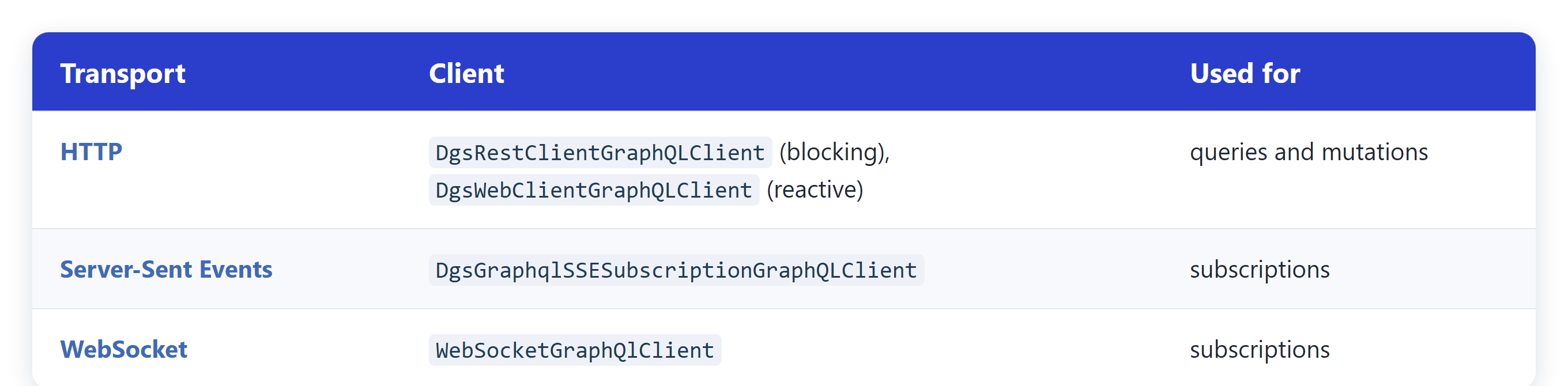
The blocking RestClient based client sends the queries and the mutations:
@SpringBootTest(webEnvironment = SpringBootTest.WebEnvironment.RANDOM_PORT)
@Import(TestcontainersConfiguration.class)
class IntegrationTests {

    @LocalServerPort
    int port;

    @Test
    void createPostOverHttp() {
        var client = new DgsRestClientGraphQLClient(
                RestClient.builder().baseUrl("http://localhost:" + port + "/graphql").build());
        var query = """
                mutation createPost($input: CreatePostInput!) {
                    createPost(createPostInput: $input) { title }
                }
                """;
        var variables = Map.of("input", Map.of(
                "title", "test title",
                "content", "test content"));

        var response = client.executeQuery(query, variables);
        String title = response.extractValueAsObject("createPost.title", String.class);

        assertThat(title).isEqualTo("test title");
    }
}
On the reactive stack, use DgsWebClientGraphQLClient, which rides Spring's
WebClient and returns Mono/Flux. Verify the result with StepVerifier:
var client = new DgsWebClientGraphQLClient(
        WebClient.create("http://localhost:" + port + "/graphql"));

var result = client.reactiveExecuteQuery(query, variables)
        .map(response -> response.extractValueAsObject("createPost", Post.class));

StepVerifier.create(result)
        .consumeNextWith(post -> assertThat(post.getTitle()).isEqualTo("test title"))
        .verifyComplete();
A subscription is opened over the Server-Sent-Events transport with the SSE client:
var baseUrl = "http://localhost:" + port + "/graphql";
var sseClient = new DgsGraphqlSSESubscriptionGraphQLClient(baseUrl, WebClient.create(baseUrl));

var content = sseClient.reactiveExecuteQuery(subscriptionQuery, Map.of())
        .map(response -> response.extractValueAsObject("commentAdded.content", String.class))
        .next()
        .block(Duration.ofSeconds(30));

assertThat(content).isEqualTo("test comment");
And over the WebSocket transport, which speaks the graphql-transport-ws
sub-protocol:
var socketClient = WebSocketGraphQlClient.create(
        URI.create("ws://localhost:" + port + "/graphql"),
        new ReactorNettyWebSocketClient());
socketClient.start().subscribe();

var content = socketClient.document(subscriptionQuery).executeSubscription()
        .map(response -> response.<Map<String, Object>>getData())
        .mapNotNull(data -> data.get("commentAdded"))
        .map(comment -> ((Map<String, Object>) comment).get("content"))
        .cast(String.class)
        .next()
        .block(Duration.ofSeconds(30));

assertThat(content).isEqualTo("test comment");
The
dgs-webflux
integration test uses the reactive client, and the
dgs-codegen
integration tests cover all three transports.
Mock remote GraphQL APIs
To test a client that calls a third-party GraphQL API, point it at a local
WireMock server instead of making a network request. The
dgs-client
module uses WireMock with a GraphQL body matcher, which compares operations
without depending on whitespace or field order.
Add these test dependencies to the client module:
<properties>
    <wiremock.version>3.13.2</wiremock.version>
    <wiremock-graphql-extension.version>0.9.0</wiremock-graphql-extension.version>
</properties>

<dependencies>
    <dependency>
        <groupId>org.springframework.boot</groupId>
        <artifactId>spring-boot-starter-test</artifactId>
        <scope>test</scope>
    </dependency>
    <dependency>
        <groupId>org.wiremock</groupId>
        <artifactId>wiremock-standalone</artifactId>
        <version>${wiremock.version}</version>
        <scope>test</scope>
    </dependency>
    <dependency>
        <groupId>io.github.nilwurtz</groupId>
        <artifactId>wiremock-graphql-extension</artifactId>
        <version>${wiremock-graphql-extension.version}</version>
        <scope>test</scope>
    </dependency>
</dependencies>
Stub the remote operation and direct the DGS HTTP client to WireMock's local URL:
String query = "{ allPosts { id title } }";
WireMockServer wireMock = new WireMockServer(
        options().dynamicPort().extensions(new GraphqlBodyMatcher()));
wireMock.start();
try {
    wireMock.stubFor(post(urlEqualTo("/graphql"))
            .andMatching(GraphqlBodyMatcher.extensionName,
                    GraphqlBodyMatcher.parameters(query, Map.of()))
            .willReturn(okJson("""
                    {"data":{"allPosts":[{"id":"1","title":"Mocked post"}]}}
                    """)));

    DgsGraphQLClient client = new DgsRestClientGraphQLClient(
            RestClient.builder().baseUrl(wireMock.url("/graphql")).build());
    DgsGraphQLResponse response = client.executeQuery(query, Map.of());
    List<Post> posts = response.extractValueAsObject(
            "allPosts", new TypeRef<List<Post>>() {});

    assertThat(posts).singleElement()
            .satisfies(post -> assertThat(post.getTitle()).isEqualTo("Mocked post"));
    wireMock.verify(postRequestedFor(urlEqualTo("/graphql")));
} finally {
    wireMock.stop();
}
Replace allPosts and the stubbed response with the operation and schema from
the third-party service. This keeps client tests repeatable and lets you test
how your code handles success responses without relying on the remote API.
The WireMock client test is in
dgs-client.
Conclusion
You now have a working DGS application and a tour of its extension points. The
base dgs module shows the core programming model; dgs-webflux the reactive
stack and subscriptions; dgs-codegen generated types, custom scalars, and
directives; dgs-client the generated client; and dgs-fileupload multipart
uploads.
From here:
- Build a real-time application with Create a Chat Application with Netflix DGS: subscriptions over Server-Sent Events and WebSocket, with Angular clients built on the component API and on signals.
- Read the DGS documentation for federation, testing, and the full annotation reference.
- See DGS or Spring GraphQL? for how DGS relates to the Spring team's framework.
Related examples: dgs-kotlin and dgs-kotlin-co show the same domain in Kotlin and coroutines.